
#Ubuntu 使用proxychains解决访问github SSL_ERROR_SYSCALL问题
从国内服务器安装一些外网应用,有时候会遇到网络问题,这时候可以用proxychains来帮忙
问题背景
最近要在ubuntu上测试OpenFaaS的faasd,但是怎么都装不上,各种网络错误。
要么连接github失败,要么网络异常中断。
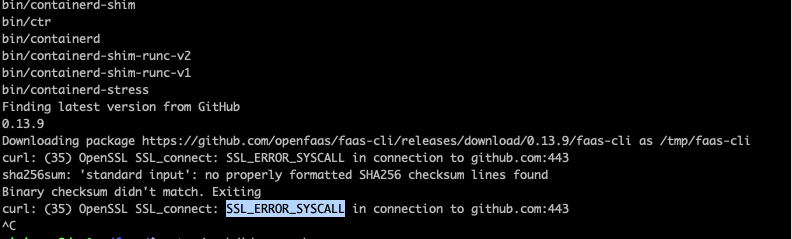
即使是在添加了http_proxy环境变量,依然是各种错误:
Finding latest version from GitHub
0.13.9
Downloading package https://github.com/openfaas/faas-cli/releases/download/0.13.9/faas-cli as /tmp/faas-cli
curl: (35) OpenSSL SSL_connect: SSL_ERROR_SYSCALL in connection to github.com:443
sha256sum: 'standard input': no properly formatted SHA256 checksum lines found
Binary checksum didn't match. Exiting
curl: (35) OpenSSL SSL_connect: SSL_ERROR_SYSCALL in connection to github.com:443
解决方法
我猜测是下载过程中,有些操作并没有走http_proxy这个设置,于是尝试搜索全局设置proxy。
最后在v2ex上发现有人提到了proxychains这个工具,终于解决了这个问题。
步骤:
- 1). 安装proxychains
sudo apt-get install proxychains
- 2). 添加socks5 代理
移除ProxyList中默认的socks4代理,然后添加
socks5
参考: [ProxyList]
add proxy here …
meanwile
defaults set to “tor”
socks5 127.0.0.1 7890 #socks4 127.0.0.1 9050
<ul>
<li>3). 用proxychains调用安装脚本</li>
</ul>
<pre><code>sudo proxychains <install.sh>
</code></pre>
<p>如果配置正确,能在日志里看到proxychains的连接信息:</p>
<p><img src="/content/images/2021/03/ubuntu-ssl-error-syscall-github-by-proxychains-02.png" alt="ubuntu-ssl-error-syscall-github-by-proxychains-02"></p>
<p>完成</p>
<!--kg-card-end: markdown-->